
I wrote the same task on three different lists last week. Once on a sticky note that’s still stuck to my desk lamp. Once in the Notes app, which I never opened again. And once, out of pure guilt, in a paper planner I bought in January and gave up on by mid-February.
If that sounds familiar, you’re not lazy or disorganized. You’re just using the wrong tool for the job. A plain to-do list is basically paper wearing a digital costume. It can’t tell you when to actually do something, it has no idea your afternoon is already booked solid, and it definitely won’t warn you before you double-book yourself.
The good news is that to-do list apps have come a long way in 2026. The best ones now act more like a planner, a calendar, and a personal assistant rolled into one. In this post, I’m going through the apps that don’t just organize your tasks but actually take over the whole mental exercise of figuring out when and how you’ll get things done.
Why Your Basic To-Do List Keeps Letting You Down
Before we get to the apps, it helps to understand why plain checklists stop working after a while.
There’s a well-known psychological quirk called the Zeigarnik effect, first written about back in 1927. Basically, unfinished tasks stay “open” in your head and quietly drain your attention even when you’re not actively working on them. A list that only tells you what to do, without ever forcing you to decide when, keeps everything open indefinitely. That’s a big part of why your brain feels like it’s running fifteen browser tabs at once, even on a slow day.
What “Replacing” a To-Do List Actually Means
A real to-do list replacement usually does at least a few of these things that a basic checklist just can’t:
- Merges with your calendar, so tasks get scheduled into real time slots instead of sitting in a pile
- Uses AI to build your day, factoring in deadlines, priorities, and how much time you’ve actually got
- Pulls tasks in from wherever they live, email, Slack, notes, other apps, into one inbox
- Adjusts when things change, rescheduling automatically if a meeting runs long or something takes longer than planned
- Includes focus tools like Pomodoro timers, habit tracking, or weekly reviews, so the app helps with the doing, not just the listing
With that in mind, here’s what’s actually worth using right now.
1. Motion: Best for Handing Off Your Planning Entirely

Motion basically takes over the job of planning your day. Every morning, its AI looks at your tasks, deadlines, and meetings and builds a full schedule on its own. If a meeting runs over or something new gets added, it reshuffles the rest of the day automatically.
Best for people who hate planning and just want a finished schedule handed to them.
The catch: it takes a bit of getting used to, and it works best if your calendar is already the center of your workday.
2. Akiflow: Best for Getting Everything Onto One Calendar

Akiflow works off a simple rule: if it’s not on your calendar, it’s not real. It pulls tasks in from Todoist, Notion, Gmail, Slack, and just about anywhere else you keep them, drops them into one inbox, and then you (or its AI) drag them onto actual time blocks. You can even tell it to schedule your ten most important tasks for the week, and it’ll find the gaps in your calendar and slot everything in based on how long similar tasks usually take.
Best for people juggling tasks across five different apps who are tired of checking all of them.
The catch: this only works if you’re genuinely willing to time-block your day. If you like keeping things loose, it’ll feel restrictive.
3. Sunsama: Best for Managers Who Need to Actually Log Off

Sunsama treats planning like a daily habit rather than a chore. It combines realistic time-blocking with a built-in Pomodoro timer, and it has working-hour limits that help you stop for the day instead of letting tasks creep into the evening. There’s also a guided weekly review that walks you through what got done, what’s coming up, and what actually matters.
Best for managers or busy professionals juggling several projects who need personal clarity, not team task assignment.
The catch: there’s no free plan, and the pricing sits higher than most apps on this list.
4. Saner.AI: Best for ADHD Brains and Mental Overload

Saner.AI was built with ADHD users in mind, and it shows. Instead of just holding a list, it acts more like a proactive assistant, reading through your inbox, notes, and calendar and handing you a plan for the day. It suggests reminders and due dates based on what you’ve already written, and its search can dig up information even if your notes are a total mess.
Best for anyone dealing with constant mental overload who wants an assistant that thinks along with them, not just a place to dump tasks.
The catch: it’s not made for large teams or complicated project timelines. This is a personal tool.
5. TickTick: Best Value for an All-in-One Setup

TickTick solves the “my app doesn’t have enough built in” problem head-on. It bundles a Pomodoro timer, habit tracker, an Eisenhower Matrix view for prioritizing, and calendar views into one app, and its natural language input works well too (type “submit report every second Thursday at 3pm” and it just gets it). Annual premium comes out to under three dollars a month, which is hard to beat for what you get.
Best for people who want tasks, habits, calendar, and a focus timer without paying for three separate subscriptions.
The catch: with that many features packed in, the interface feels busier than something more minimal.
6. Any.do: Best for Individuals and Families Who Want One Simple App

Any.do‘s “My Day” feature is the reason people stick with it. Each morning it walks you through your tasks and asks what you’ll realistically get done today, turning an overwhelming backlog into a short list you can actually finish. It combines tasks and calendar into one view, supports shared spaces for family schedules, and even lets you add tasks by voice or WhatsApp message.
Best for individuals and families who want tasks, calendar, and shared lists without extra complexity.
The catch: its natural language input isn’t quite as sharp as Todoist’s when you’re typing something more complicated.
7. Todoist: Best for Getting Things Out of Your Head Fast
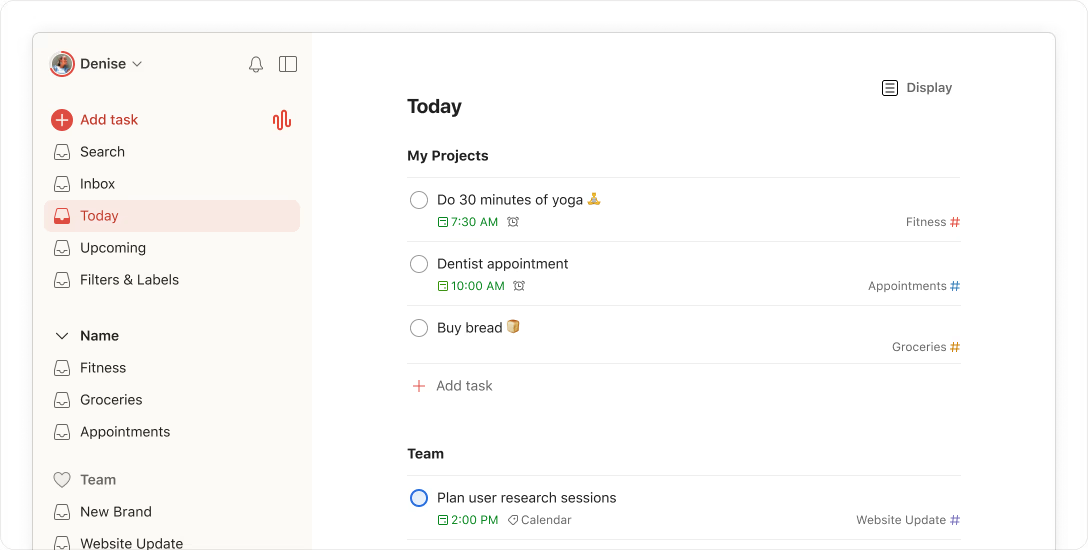
Todoist has been the go-to app for years, and the reason is simple: it’s fast. Type a task in plain English and it figures out the date, time, and recurrence on its own. Its newer Ramble feature takes this a step further. You can talk out loud about everything on your mind, and the AI sorts it into separate, organized tasks for you.
Best for anyone who just wants the fastest way to get thoughts out of their head and into a system they trust.
The catch: it shows tasks by date but doesn’t really merge with your calendar. If you want proper time-blocking, you’ll need to pair it with something else or look elsewhere on this list.
8. Superlist: Best for Combining Tasks With Notes

Superlist blends tasks with lightweight docs, so it can replace your separate notes app too. You can nest lists, add images, and keep everything about a project in one place instead of bouncing between apps. It’s genuinely handy during something chaotic like a move or a big personal project.
Best for individuals or couples who want tasks and notes together in one clean space.
The catch: once you try to collaborate with more than a handful of people, the flat list structure starts to feel messy.
Quick Comparison
| App | Best For | Standout Feature | Free Plan? |
|---|---|---|---|
| Motion | Full AI auto-scheduling | Rebuilds your day automatically | No |
| Akiflow | Unifying tasks from every app | Drag-to-calendar time blocking | No |
| Sunsama | Managers needing boundaries | Working-hour limits, weekly review | No |
| Saner.AI | ADHD and cognitive overload | Proactive AI daily planner | Yes, limited |
| TickTick | All-in-one value | Habits, Pomodoro, calendar bundled | Yes |
| Any.do | Families and individuals | “My Day” planning ritual | Yes |
| Todoist | Fast capture | Ramble voice-to-task AI | Yes |
| Superlist | Tasks plus notes | Nested lists with docs | Yes, up to 5 users |
How to Actually Pick One
The best app isn’t the one with the longest feature list. It’s the one you’re still using in three weeks. A quick way to narrow it down:
If you procrastinate on planning, try Motion or Akiflow and let the AI build your schedule.
If your brain feels constantly overloaded, Saner.AI is built for exactly that.
If you’re juggling work and personal life and keep working past 6pm, Sunsama’s boundaries are worth the price.
If you just want something fast and simple, Todoist or Any.do will get you going in minutes.
If you want the most features for the least money, TickTick is tough to beat.
Whatever you pick, give it a real two or three weeks before deciding whether it’s working. Every new system feels a little clunky in week one. That’s not the app’s fault, it’s just the adjustment.
Frequently Asked Questions
Do I really need to replace my to-do list, or is a plain checklist enough?
If you’re only managing a handful of personal tasks, something simple like Google Tasks or Apple Reminders is fine. But if you’re juggling deadlines across work and life, or you keep forgetting things despite writing them down, a calendar-based or AI-powered app solves problems a checklist just can’t.
Are AI scheduling apps worth the extra cost?
For people who struggle with the planning itself, not just remembering tasks, yes. The value isn’t the AI as a gimmick. It’s that these apps take away the daily decision fatigue of figuring out when you’ll actually do something.
Can I use more than one of these apps together?
Sure, plenty of people do. A common combo is a fast-capture app like Todoist feeding into a time-blocking tool like Akiflow, so you get quick capture and scheduling discipline in one workflow.
What’s the single most important feature to look for?
Speed of capture. If adding a task takes more than a couple of seconds, you won’t do it consistently, and an app you don’t use is worse than no app at all.
The goal isn’t finding the app with the most bells and whistles. It’s finding the one that finally gets tasks out of your head and into something you trust enough to stop thinking about until it’s time to act. Pick one from this list, give it a real shot for a few weeks, and see how much lighter your head feels.



Leave a Reply